
VBI Recorder
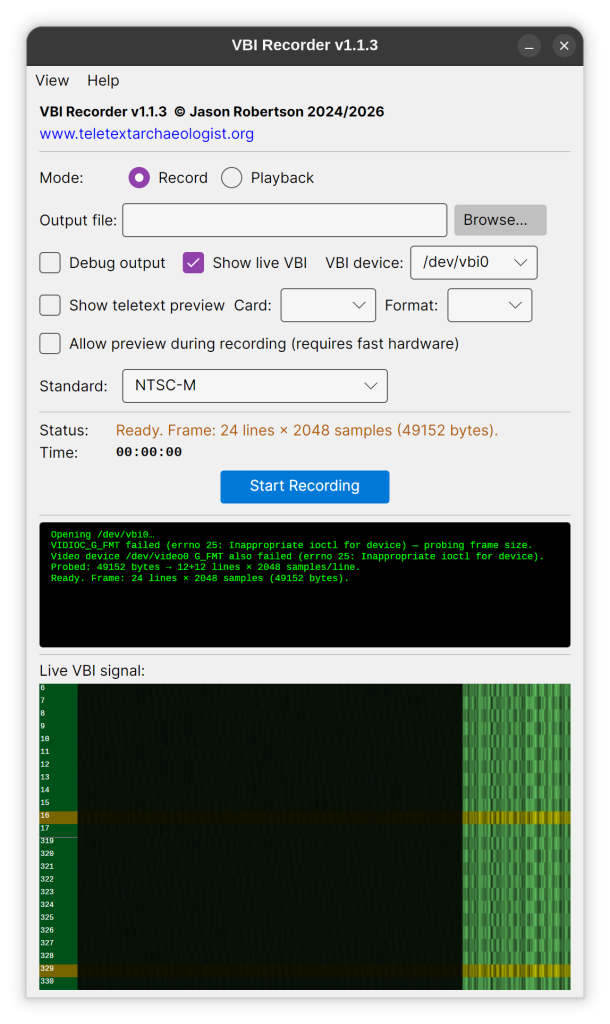
VBI Recorder allows you to use modern hardware to capture VBI data for processing into teletext – you need a particular USB dongle, the August VGB100, which you can still buy at retail, and any Windows or Linux PC, even laptops!
Note the incredibly convenient live (or playback) teletext view, so you can see the pages go past as you recover, and built-in VBI viewer (Linux app shown, Windows version is similar):
Download for Windows and Linux
Teletext Player

This is a program for Windows which emulates a teletext television in a line-exact way – that is to say, you can experience teletext pages exactly as they were broadcast. The pages flick by in exactly the order they were originally shown in; you have to wait for pages to be ‘broadcast’ (unless you have turned the cache mode on!) and you can play Bamboozle! You can also make it totally immersive using the full-screen mode.
Not only can you browse recovered teletext services, you can fetch a current one too: Teefax – a British teletext service which is still updated (see below)!
(For this, you need t42 files – examples coming soon)
Download TeletextPlayer for Windows, Mac and Linux
Teletext Recovery Editor

Download Teletext Recovery Editor for Windows, Mac and Linux
From other teletext people:
VHS Teletext
Alistair Buxton’s fantastic recovery tools which make all this possible. It runs in Linux and I use it with a Win-TV PCI card from around the year 2000. Not all PCI cards will work, so be prepared for a bit of trial and error. Or, for modern hardware, you can use the deconvolve features of VHS Teletext with the capture features of VBI Recorder above.
Raspi-Teletext
Alistair does it again with this great tool for the Raspberry Pi – given a raw teletext data source it converts this to the digital data which is output on a domestic TV. The upshot is that if you output the Pi via composite, run this and press ‘Text’ on your TV you will see teletext on your actual television.
Teefax
Peter Kwan’s online-driven, actually-on-your-TV teletext service is a easy way to get going if you’re a beginner with its step-by-step guide to installing it.
Teletext Page Designing Tools
Simon Rawles’ edit.tf and Alistair Cree’s ZXNet Editor are great online teletext editors if you want to try your hand at designing your own pages on your web browser. On both, all you have to do to save your work is just bookmark the page!
You can even then use the finished product to upload to Teefax for Teefax users to see on their teletext sets at home! The ZXNet Editor even supports higher-level teletext modes.
edit.tf:

ZXNet Editor:
